
Every Big Service Company Lets Customers Book Online. Can Your HVAC Customers Do the Same?

A homeowner notices that the air conditioner is struggling after dinner. The problem does not require emergency dispatch. The homeowner simply wants to arrange a service visit for later in the week. On the contractor’s website, however, the only booking option is a telephone number.
The office is closed. The homeowner can leave a voicemail, remember to call tomorrow, or search for another contractor whose website lets them review services and request an available slot. That small difference in convenience can shape the customer’s next step.
Consumers are accustomed to handling many everyday tasks online, from scheduling appointments to paying bills. HVAC service is more complicated than reserving a restaurant table, but customers can still benefit from a clear, mobile-friendly booking experience.
The question for an HVAC owner is not whether every job can be scheduled automatically. It is whether customers can take a useful next step without waiting for office hours—and whether the company can deliver on the choices shown.
Every Big Service Company Makes Booking Feel Simple. What About Your HVAC Business?
Large consumer-service brands often let customers browse options, choose a date, and complete a transaction on a phone. Independent HVAC contractors may assume this level of convenience requires a large office or a custom-built app. It does not always require either.
A mobile-friendly online booking page can be a practical starting point. The experience matters more than whether it is delivered through a native app or a website. Customers should understand what they are booking, which options they can choose, and what happens after they submit the form.
An effective booking flow can reduce routine back-and-forth for straightforward services. It should also make it easy to contact a person when the situation is urgent, technically uncertain, or unsuitable for self-service scheduling.
It’s 10:30 PM. Can a Homeowner Book Your Company?
Imagine a homeowner sitting in the living room on a warm evening. Their thermostat shows 82°F. They decide they want an HVAC professional to inspect the system, but they are comfortable waiting until a normal service window.
If the company has an appropriate online booking option, the homeowner might select a diagnostic service, review available dates, choose a suitable time, and receive a confirmation or clear request acknowledgment. If the company cannot verify availability, the page should say so rather than inventing a guaranteed appointment.
The business does not need to answer a late-night call or dispatch a technician immediately to offer that convenience. Online booking can be accessible after hours without implying that technicians are available around the clock.
A homeowner with a potentially dangerous condition, however, needs appropriate safety guidance and a way to seek urgent assistance. A booking form should never substitute for emergency instructions or professional triage.

What Customers Actually Want From an Online Booking Experience
Most homeowners do not want to study a complicated service catalog. They want to describe their need, understand their options, and know whether the company has confirmed their appointment. The design should make those steps obvious.
A clear service choice
An appointment called “AC maintenance” is easier to understand than an unclear office service code. A diagnostic visit should not promise a completed repair. Explain what the visit covers and what the technician may need to check later.
Availability they can trust
Customers need to know whether the company can offer a displayed slot, is holding it, or still needs to confirm it. If the company cannot keep technician schedules up to date, an appointment-request model may give customers a clearer answer than instant confirmation.
An understandable next step
After submission, explain whether the customer has a confirmed appointment, a pending request, or a reservation that still needs payment. Send accurate details through an appropriate channel and provide a way to correct mistakes.
Payment clarity
If the company collects payment or a deposit, disclose the amount, what it covers, applicable cancellation terms, and when additional charges may be discussed. Never make customers assume an online diagnostic booking includes every possible repair.
Five Choices That Can Make HVAC Booking More Convenient
A flexible online booking journey may allow customers to select a product or equipment category, a service, a preferred staff member, an available date and time, and a payment option. Not every contractor should expose every choice in every situation.
1. Choose a product or equipment category
A customer may need help with a central air conditioner, heat pump, furnace, or other supported equipment. Product selection can guide the booking process toward relevant services. Keep categories understandable and offer an “I’m not sure” path when the homeowner cannot identify the system.
2. Choose the service
Present clear options such as routine maintenance, system inspection, or diagnostic visit, depending on the company’s actual offerings. Explain whether the appointment is for assessment, maintenance, or a defined service. Avoid promising that a particular fault will be fixed before a technician diagnoses it.
3. Choose preferred staff
Some customers prefer a technician they have worked with before. Staff selection can be useful when the company allows it and the technician has the right skills and an open slot. It should remain optional where a particular assignment would delay urgent work or create an unrealistic promise.
4. Choose a date and available time
A calendar should show realistic service windows that reflect operating hours, technician skills, travel time, and existing commitments. A slot shown on a website should not contradict the office’s schedule. When the customer has only requested a window, label it accordingly.
5. Complete payment when appropriate
Online payment may help a company collect a disclosed booking fee, deposit, or other agreed amount when the company enables it. Customers should know whether payment is required to finalize the booking and receive a receipt or acknowledgment. Use a reputable payment processor and follow applicable security and consumer-protection requirements.
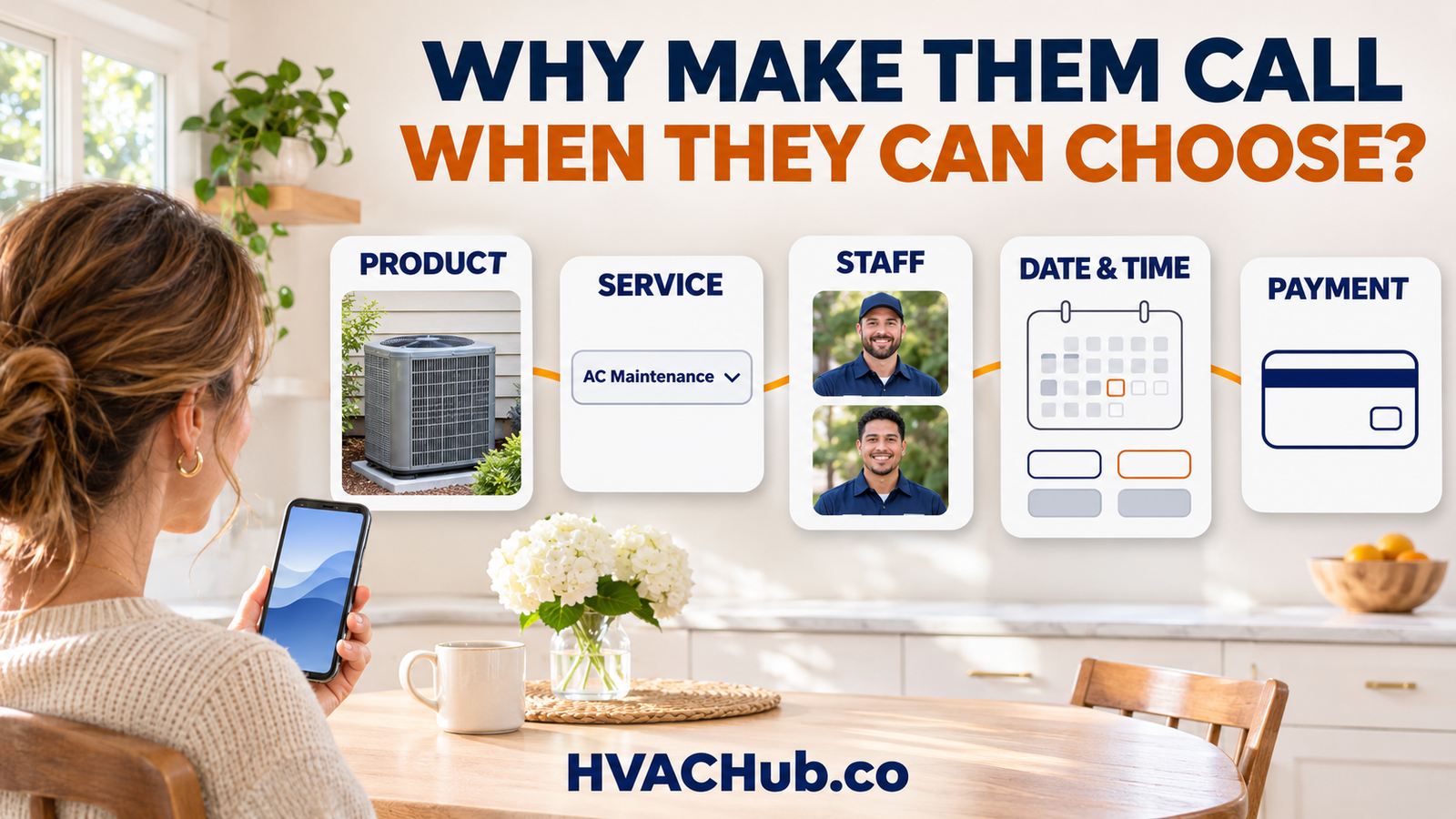
A Better Booking Journey, From First Tap to Service Visit
Picture a customer who wants a seasonal AC maintenance appointment. They open the contractor’s mobile-friendly booking page and choose the equipment category. The page presents only the relevant service choices rather than every item the company sells.
They select maintenance, review the description, and choose a preferred technician if that option is available. Next, they see a set of genuine appointment windows. The page makes clear whether the company confirms the slot immediately or dispatch must review it.
If the company asks for a deposit, the customer sees the terms before paying. Finally, they receive a message summarizing the appointment status, location, service selected, and any important preparation instructions.
This flow sounds simple because the customer sees only the choices that matter. Behind the scenes, the contractor still needs accurate service definitions, working hours, scheduling rules, staff assignments, and reliable communication.
Online Booking Should Not Create an Overbooked Dispatch Board
A booking page is only as dependable as the availability behind it. If the online calendar and office schedule do not stay in sync, customers may select time slots that other customers have already booked. That can turn a convenience feature into a new source of frustration.
Before enabling self-service bookings, decide which services customers can book without staff review. Routine maintenance may be easier to schedule than an unknown no-cooling complaint or a job requiring specialized equipment.
Set realistic appointment durations and travel allowances. Consider geographic service areas, technician qualifications, holidays, and emergency capacity. Test what happens when an employee blocks a day, a technician calls out sick, or an appointment is rescheduled.
Where real-time capacity cannot be assured, use an explicit request-and-confirm workflow. A clear pending status is more professional than a false confirmation.
Do You Need a Mobile App or a Booking Website?
Many contractors hear “online booking” and assume they must invest in a dedicated downloadable app. For many small and medium-sized businesses, a responsive booking page accessible from the company website may offer a more practical first step.
Customers should not need to install software or create an unnecessary account just to request a straightforward service visit. The booking experience should work on a typical phone, load clearly, and avoid excessive form fields.
Some businesses may benefit from a dedicated app, but it should solve a demonstrated customer need rather than serve as a status symbol. Test the actual customer journey before choosing a delivery format.
The Questions Every HVAC Owner Should Ask Before Launching Online Booking
Which services are safe to offer for self-booking?
Start with predictable appointment types. Define what is included, how long the visit typically takes, and when an office review is required. Keep technically complex requests from being mislabeled as simple maintenance.
Can customers select any technician?
Only offer staff choices that the scheduling process can support. A customer’s preferred technician may be unavailable or unsuited to the requested job. Provide alternatives and communicate assignments accurately.
What happens if the customer chooses the wrong service?
Provide a way to correct the request before the visit. A short description field can help staff review unusual needs, but avoid asking homeowners to diagnose equipment themselves.
What happens when a slot changes?
Establish a process for notifying the customer promptly, proposing alternatives, and documenting the updated arrangement. The customer should never discover a schedule change only after waiting at home.
How are payments and refunds handled?
Make charges, refund conditions, cancellation rules, and payment receipts clear. Confirm that the payment process meets applicable rules and that staff can match transactions to bookings.
How Online Booking Can Help the Office Team
A structured booking flow may collect routine information before an employee has to call the homeowner. That can reduce repetitive questions about service type, preferred timing, and address, provided the form is designed carefully.
The office still plays an important role. Staff must review exceptions, respond to uncertain requests, coordinate changes, and handle customers who prefer the phone. Online booking should complement good customer service, not eliminate human support.
Track whether the process actually saves time. If employees must re-enter every online booking manually or correct frequent errors, the workflow may need adjustment.
Don’t Force Every Homeowner Through the Same Process
Some customers are comfortable choosing a service and paying online. Others need to describe an unusual problem or ask about accessibility, equipment, or pricing before making a decision. Give them a clear contact option.
Keep forms accessible and easy to navigate. Use understandable labels, readable contrast, and straightforward error messages. Avoid making a customer provide unrelated personal information before viewing basic service options.
For urgent safety concerns, clearly direct people to appropriate assistance. A convenient booking page should not suggest that every problem can wait for a normal appointment.
A Seven-Day Plan to Test Online Booking
Day 1: List your bookable services
Identify the appointment types with predictable scope and duration. Write plain-language descriptions and note which requests need staff review.
Day 2: Map your capacity
Review technician availability, service areas, travel time, business hours, and existing commitments. Decide what a genuine available slot means for your company.
Day 3: Define the customer choices
Decide whether product categories, service types, staff preferences, and payments should appear for each booking type. Do not add steps just because the software supports them.
Day 4: Test the booking journey on a phone
Ask someone unfamiliar with the process to book a sample appointment. Watch for confusing language, unnecessary fields, or unclear confirmation status.
Day 5: Test exceptions
Try an unavailable technician, a canceled slot, a mistaken service selection, and a payment that does not complete. Verify that the customer receives an accurate explanation.
Day 6: Train the office and field team
Agree on who monitors requests, handles changes, reconciles payments, and contacts customers when a booking requires clarification.
Day 7: Review results
Measure booking completion, customer questions, scheduling corrections, and staff time spent resolving exceptions. Improve the process before promoting it widely.
What Should You Measure After Launch?
Do not judge success only by the number of online submissions. Track how many requests become valid appointments, how many require manual correction, how often customers leave before finishing, and whether the company honors promised time windows.
Look at customer feedback as well. Did the homeowner understand the service? Was the payment explanation clear? Could they change an appointment without confusion? These details reveal whether the booking experience is truly easier.
Avoid assuming that online booking automatically increases revenue. The outcome depends on customer demand, implementation, staffing, and how well the company fulfills booked work.
An Online Booking Option for HVAC Businesses
HVAC Community Hub and HVACB.com are affiliated. This article introduces the online booking software as an affiliated offering for HVAC businesses, rather than as an independently reviewed third-party service.
The proposed booking experience includes configurable customer choices for products, services, staff, available dates and time slots, and payment where enabled. Contractors should verify the exact available features, integrations, and setup requirements before relying on them for live scheduling.

The offer described for this booking software is the first three months free, followed by $39 per month only if you choose to continue. These terms and the correct booking-software claim destination need confirmation before publication. Do not assume the separate HVACB Business Suite Black Friday page is the booking-software enrollment page.
Frequently Asked Questions
Can HVAC customers book services online without calling?
Yes, when a contractor provides an appropriate booking page or app. The company must still determine which services can be booked directly and which requests the office must review.
Can customers choose a particular HVAC technician?
Some booking systems support staff selection. Availability, qualifications, and the contractor’s scheduling policies determine whether a particular choice can be honored.
Can an HVAC booking page collect payments?
A suitable system may support payment or deposit collection when configured. The company should disclose charges, use appropriate payment processing, and explain refund and cancellation terms.
Does online booking mean technicians work 24 hours a day?
No. Customers may be able to submit requests or select future appointments outside office hours without receiving immediate technician service.
Is a dedicated mobile app necessary?
Not necessarily. A well-designed mobile-friendly booking website may provide the convenience many homeowners need without requiring an app download.
Your Customers Already Know How to Book Online
The question is whether your HVAC business gives them a clear, trustworthy way to do it. A simple booking experience can let customers explore services, select suitable options, and understand the next step—even when the office is closed.
Start with the services you can schedule reliably. Make availability honest, explain payments clearly, and keep a human contact option for situations that need judgment. Convenience only builds trust when the company delivers what the booking page promises.
How does your HVAC company handle online appointment requests today? Share your experience with other contractors at HVACHub.co.



Responses